Examples
Create a print with searchable metadata, then find it again with the search API.
This guide walks through the two core workflows of the Prints API end to end:
- Create a print — upload ESC/POS bytes together with searchable metadata
(
label,deviceId,tag). - Search prints — find prints back with field filters, tag queries, and a
from/todate range.
You need an API token with the read and write scopes (see
Authentication) and the slug of the workspace you are working in. The
examples below use my-team as the slug and assume the token is exported as
$VPRINTER_TOKEN.
Create a print
A print is created from raw ESC/POS bytes. There are two ingest endpoints:
POST /api/workspace/{slug}/prints/json— JSON body with the bytes base64-encoded inraw, metadata as sibling fields.POST /api/workspace/{slug}/prints— the bytes as a binary request body, metadata as query parameters.
Metadata is what makes a print findable later, so attach it at ingest time:
| Field | Purpose |
|---|---|
label | Human-readable name shown in the dashboard list (e.g. an order number). |
deviceId | Identifier of the device that produced the print (e.g. a kiosk or POS id). |
tag | Free-form key → value string map, queryable with tag queries. Up to 100 keys; keys and values up to 100 characters. |
width | Receipt render width in monospace columns (24–80). Omit to use the workspace default. |
JSON (base64) upload
The raw value below is a real, complete ESC/POS receipt (init → centered bold
header → item rows → cut), so you can run the command as-is:
curl -X POST https://api.vprinter.dev/api/workspace/my-team/prints/json \
  -H "Authorization: Bearer $VPRINTER_TOKEN" \
  -H "Content-Type: application/json" \
  -d '{
    "raw": "G0AbYQEbRQFWUFJJTlRFUiBDQUZFChtFADEyMyBQcmludCBTdHJlZXQKG2EALS0tLS0tLS0tLS0tLS0tLS0tLS0tLS0tLS0tLS0tLS0KQW1lcmljYW5vICAgICAgICAgICAgICAyICAgIDcuMDAKQ3JvaXNzYW50ICAgICAgICAgICAgICAxICAgIDMuNTAKLS0tLS0tLS0tLS0tLS0tLS0tLS0tLS0tLS0tLS0tLS0KG0UBVE9UQUwgICAgICAgICAgICAgICAgICAgICAgMTAuNTAKG0UAG2EBVGhhbmsgeW91IQobZAMdVgA=",
    "label": "order-1042",
    "deviceId": "kiosk-1",
    "width": 32,
    "tag": { "orderType": "delivery", "store": "gangnam" }
  }'
The stored print renders in the dashboard as a receipt preview, and the metadata travels with it:
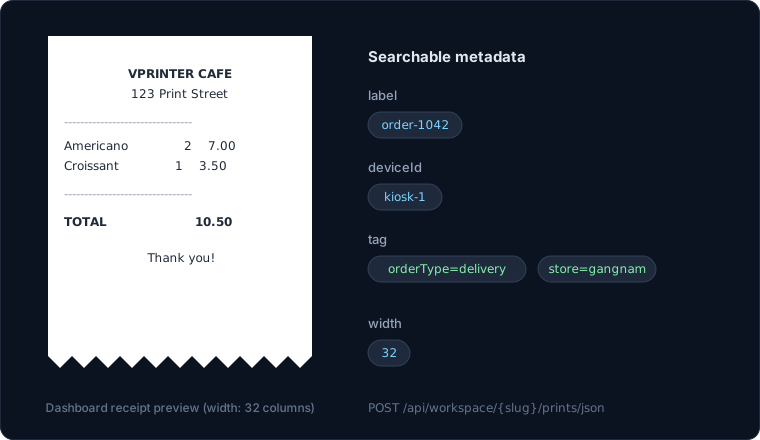
The response is the created print:
{
  "id": 1042,
  "printKey": "pk_8f2c1a…",
  "label": "order-1042",
  "deviceId": "kiosk-1",
  "tag": { "orderType": "delivery", "store": "gangnam" },
  "width": 32,
  "quantity": null,
  "testPrint": false,
  "createdAt": "2026-06-12T09:30:00.000Z",
  "updatedAt": "2026-06-12T09:30:00.000Z"
}
Binary upload
The same print as a raw binary body. Metadata moves to query parameters; tags
are repeated tag=key=value pairs (URL-encode the = inside the pair as
%3D):
curl -X POST 'https://api.vprinter.dev/api/workspace/my-team/prints?label=order-1042&deviceId=kiosk-1&width=32&tag=orderType%3Ddelivery&tag=store%3Dgangnam' \
  -H "Authorization: Bearer $VPRINTER_TOKEN" \
  -H "Content-Type: application/octet-stream" \
  --data-binary @receipt.bin
Generating the bytes
Any ESC/POS source works — a printer driver capture, an SDK, or
react-thermal-printer, which composes the
receipt as React components and renders it to the exact byte stream vprinter
ingests:
import { Cut, Line, Printer, Row, Text, render } from 'react-thermal-printer';

const data = await render(
  <Printer type="epson" width={32}>
    <Text align="center" bold={true}>VPRINTER CAFE</Text>
    <Text align="center">123 Print Street</Text>
    <Line />
    <Row left="Americano  2" right="7.00" />
    <Row left="Croissant  1" right="3.50" />
    <Line />
    <Row left="TOTAL" right="10.50" />
    <Text align="center">Thank you!</Text>
    <Cut />
  </Printer>
);

await fetch('https://api.vprinter.dev/api/workspace/my-team/prints/json', {
  method: 'POST',
  headers: {
    authorization: `Bearer ${process.env.VPRINTER_TOKEN}`,
    'content-type': 'application/json',
  },
  body: JSON.stringify({
    raw: Buffer.from(data).toString('base64'),
    label: 'order-1042',
    deviceId: 'kiosk-1',
    width: 32,
    tag: { orderType: 'delivery', store: 'gangnam' },
  }),
});
Search prints
POST /api/workspace/{slug}/prints/search takes all filters in the JSON body.
Every filter you pass is combined with AND; an empty body ({}) returns
everything, newest first.
curl -X POST https://api.vprinter.dev/api/workspace/my-team/prints/search \
  -H "Authorization: Bearer $VPRINTER_TOKEN" \
  -H "Content-Type: application/json" \
  -d '{ "label": "order-1042" }'
Responses are paginated:
{
  "items": [ { "id": 1042, "label": "order-1042", "…": "…" } ],
  "total": 1,
  "page": 1,
  "pageSize": 100,
  "totalPage": 1,
  "hasNext": false,
  "hasPrev": false
}
String field filters
printKey, label and deviceId accept either a bare string — an exact
match — or an { "op", "value" } object:
op | Meaning |
|---|---|
eq | Exact match (the default for a bare string). |
neq | Not equal. |
contains | Case-insensitive substring match. |
{
  "label": { "op": "contains", "value": "order" },
  "deviceId": "kiosk-1"
}
Filter by tags
The tag filter queries the print's tag map. Its simplest form is a single
condition:
{ "tag": { "op": "eq", "key": "orderType", "value": "delivery" } }A condition has three parts:
| Part | Meaning |
|---|---|
op | eq, neq or contains — same semantics as the string field operators, applied to the tag's value. |
key | The tag key to look at (e.g. orderType). |
value | The value to compare against. |
So the query above matches prints whose orderType tag is exactly
delivery; { "op": "contains", "key": "store", "value": "gang" } matches
prints whose store tag contains gang anywhere (case-insensitive), such as
gangnam or Gangneung.
Combining conditions with and / or
Instead of a single condition, tag can be a group: an object with an
and or or array of nested tag queries. Groups can contain conditions or
further groups, up to 10 entries per group and 3 levels of nesting.
Match delivery orders from a store containing gang:
curl -X POST https://api.vprinter.dev/api/workspace/my-team/prints/search \
  -H "Authorization: Bearer $VPRINTER_TOKEN" \
  -H "Content-Type: application/json" \
  -d '{
    "tag": {
      "and": [
        { "op": "eq", "key": "orderType", "value": "delivery" },
        { "op": "contains", "key": "store", "value": "gang" }
      ]
    }
  }'
Both conditions must hold on the same print for it to match:
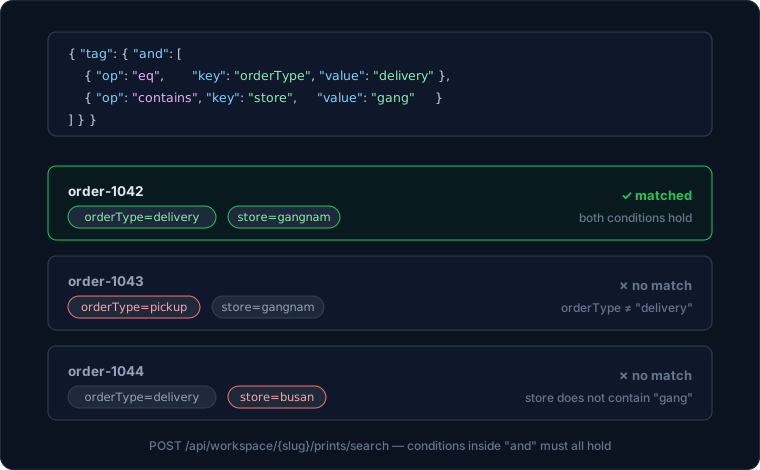
Groups nest, so richer logic stays one query. Delivery orders that are either
from the Gangnam store or handled by a courier whose name contains riders,
excluding cancelled ones:
{
  "tag": {
    "and": [
      { "op": "eq", "key": "orderType", "value": "delivery" },
      { "op": "neq", "key": "status", "value": "cancelled" },
      {
        "or": [
          { "op": "eq", "key": "store", "value": "gangnam" },
          { "op": "contains", "key": "courier", "value": "riders" }
        ]
      }
    ]
  }
}
A few things to keep in mind:
- A condition on a key the print does not have never matches — including with
neq.{ "op": "neq", "key": "status", "value": "cancelled" }matches prints whosestatustag exists and is notcancelled, not prints without astatustag. - Keys are matched exactly (no
containson the key itself); operators apply to the tag value. - The
tagfilter combines with every other filter in the body with AND, like everything else.
Filter by date (from / to)
from and to bound the print's createdAt, both inclusive, as ISO 8601
timestamps. Pass either or both:
{
  "from": "2026-06-01T00:00:00Z",
  "to": "2026-06-30T23:59:59Z"
}
Offsets are honored, so 2026-06-01T09:00:00+09:00 and
2026-06-01T00:00:00Z are the same instant.
Pagination and ordering
page (1-based), pageSize (max 1000, default 100) and orderBy
(id, createdAt or updatedAt with .asc/.desc) shape the result list.
Putting it all together — page two of June's delivery orders, oldest first:
curl -X POST https://api.vprinter.dev/api/workspace/my-team/prints/search \
  -H "Authorization: Bearer $VPRINTER_TOKEN" \
  -H "Content-Type: application/json" \
  -d '{
    "tag": { "op": "eq", "key": "orderType", "value": "delivery" },
    "from": "2026-06-01T00:00:00Z",
    "to": "2026-06-30T23:59:59Z",
    "orderBy": "createdAt.asc",
    "page": 2,
    "pageSize": 50
  }'